In-App Purchase vs Subscription: Which Fits Your App?
Here’s how to choose an in-app purchase or subscription for your app and learn what each store requires.
Your app’s pricing model should not be a guess, even if your game sells extra lives. This guide compares an in-app purchase with a subscription. It helps developers decide how the app earns money, what customers receive, and what each app store expects. Ask: “When does my customer receive the thing they paid for?”
That question keeps the product offer clear. A permanent filter pack and a library that grows every week can both be paid products, but they make different promises. If you price them in the same way, users, support staff, and store reviewers can get confused.
In-app purchase and subscription are not opposites
An in-app purchase is the broad store category for digital content, features, or services sold in an app. A subscription is one type of in-app purchase. On Apple platforms, you set up purchases in App Store Connect and use StoreKit in the app. On Android, Google Play Billing handles digital one-time products and subscriptions.
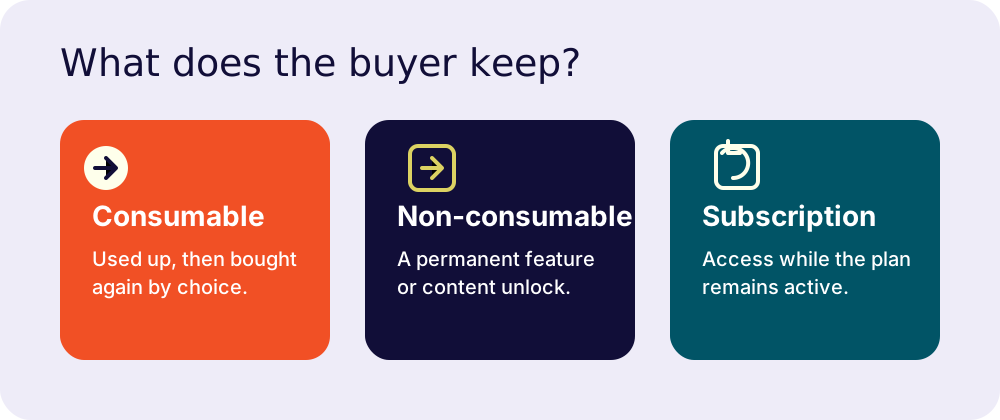
The categories matter because each one describes a different kind of access:
Consumables are used and bought again
A consumable is something the customer uses up. Extra lives, in-game currency, credits, or a single exported report are common examples. Apple defines consumables as products used once and then purchased again. Google Play treats them as one-time products, and your app must grant the entitlement, or purchased access, after a successful purchase.
Consumables can be bought repeatedly, but repeated payment does not make them subscriptions. The user chooses each purchase. There is no renewal date.
Non-consumables are durable unlocks
A non-consumable unlocks something that does not expire or run out, such as an ad-free upgrade, a permanent feature, or a pack of levels. Apple says an app must include a restore method for restorable purchases under Guideline 3.1.1.
“Restore” means a person who reinstalls the app or changes devices can get what they already bought. On Android, Google calls this access an entitlement. A one-time product gives permanent access, while a subscription gives access while active. Do not make someone buy the same unlock twice.
Subscriptions sell access over time
An auto-renewable subscription gives access for a billing period and renews unless the customer cancels. Apple says subscriptions should provide ongoing value, such as regularly updated content, new game levels, software as a service, or cloud support. Google Play’s policy has a similar test: subscriptions must give sustained or recurring value. They cannot present a one-time benefit as recurring access.
A subscription is not a monthly receipt. It is a promise to keep giving people a reason to stay.
Choose by the value your app keeps delivering
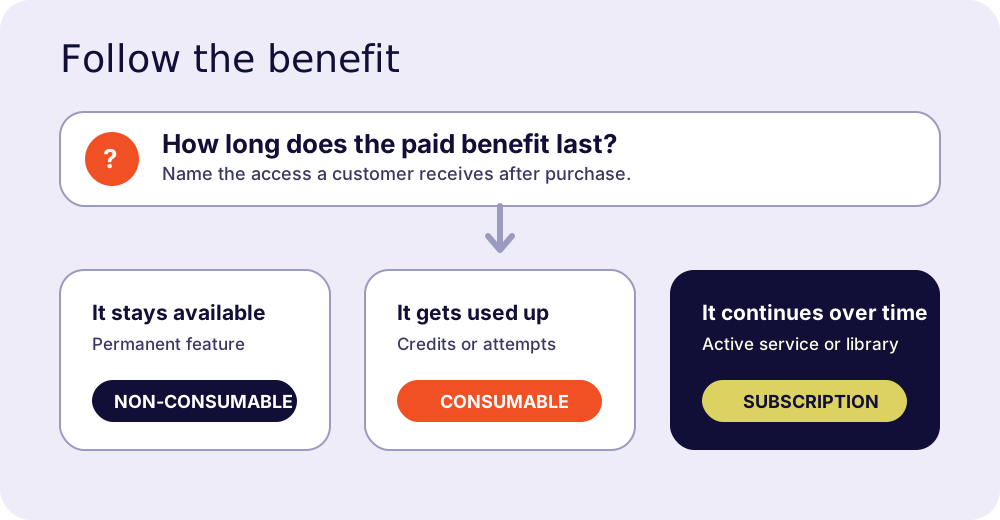
Start with the benefit, not the billing cycle. Use this test: a customer should be able to say what they receive and why it is a one-time, repeat, or ongoing purchase.
| If your app sells… | A fitting model | Why it fits |
|---|---|---|
| A permanent feature, tool, or content pack | Non-consumable in-app purchase | The benefit remains available after the purchase. |
| Credits, extra attempts, or a per-use resource | Consumable in-app purchase | The benefit is used up and can be chosen again. |
| An updated library, active service, or cloud feature | Subscription | The customer keeps receiving access or change over time. |
| A durable add-on plus an ongoing service | Hybrid | Each paid item can make a separate promise. |
Signs a one-time purchase fits
Use a one-time purchase when the paid feature has a clear end point. A photo app might sell a permanent export format. A game might sell a level pack. A utility might sell an upgrade that stays useful without monthly work. The customer pays, receives the feature, and keeps it.
The work does not end at the payment screen. You still need to test purchase delivery, keep durable purchases available after reinstall, and help support identify what the person owns. You do not need to create new monthly reasons for the same purchase.
Signs a subscription fits
Subscriptions fit when the paid experience keeps changing or running. Think of a content library with new material, a service that stores and syncs data, or a tool that gets substantial updates as part of the paid service. Apple’s subscription guidance says developers should plan to update the app regularly with feature improvements or expanded content.
Before you choose this model, write one plain sentence: “Every billing period, the customer continues to receive ___.” If the blank only says “the thing they already got,” use a one-time product instead. Google Play says a subscription cannot be used for what is effectively a lump-sum credit or single-use booster.
Charge repeatedly only when the app gives people a clear reason to keep receiving something new or ongoing.
Compare the work behind each model
One-time purchases and subscriptions both need reliable purchase handling. The difference is how long you need to manage access after the first purchase.
For a one-time product, your app needs to deliver the paid feature once, remember the entitlement, and restore it where the store requires restoration. Also test a purchase interrupted by a network change, a reinstall, and a signed-in user moving to a new device.
Subscriptions add a repeating access state. You need to handle active access, renewals, billing problems, cancellations, expiration, refunds where relevant, and plan changes. Apple recommends using StoreKit and its server tools to keep transaction and subscription status current. Google recommends a secure backend to verify purchases and handle real-time subscription changes.
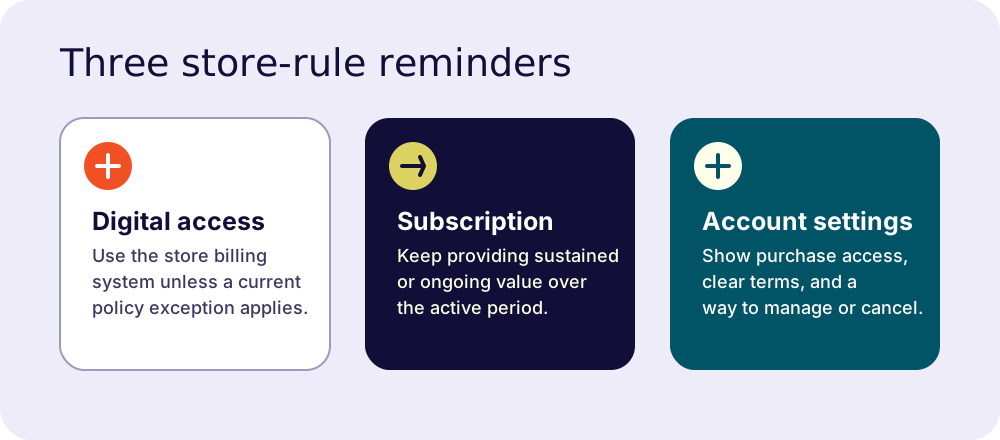
The customer-facing work changes too. A durable purchase needs a clear “you own this” state. A subscription needs a clear description of what renews, how often it bills, what the customer gets, and where they can manage or cancel it. Put this information on the paywall and in account settings.
When a hybrid model makes sense
A hybrid monetization model can work when your app sells two different kinds of value. You could sell permanent template packs alongside a subscription to a continually updated content library. A game could offer individual consumables alongside a membership that adds levels or multiplayer access.
Apple allows subscriptions alongside à la carte purchases. Do not make two prices compete for the same vague “premium” promise. Name what each item gives, show what remains after cancellation, and do not make a user buy overlapping access by accident.
If a lifetime unlock and a subscription both exist, preserve what lifetime customers paid for. Apple’s guidelines say developers should not take away primary functionality that existing customers already purchased when changing to a subscription model.
Store rules shape the choice on iOS and Android
Do not leave the payment system until the end. Store rules affect the product model, purchase screen, and account page you need to build.
Apple: StoreKit and App Review Guidelines
Under App Review Guideline 3.1.1, apps that unlock in-app features or functionality, including premium content, game currency, subscriptions, or a full version, must use In-App Purchase unless a listed exception applies. The rule has exceptions and storefront-specific provisions. Read the current wording before you build an external checkout path.
For subscriptions, Guideline 3.1.2 says you must provide ongoing value, make subscriptions available across a user’s devices where the app is available, and clearly describe what the user gets for the price. Configure the products in App Store Connect and use StoreKit to show products and manage entitlements.
Google Play: Billing, clear terms, and cancellation
Google’s Payments policy requires Google Play’s billing system for paid access to in-app digital features, services, content, and subscriptions unless a policy exception or eligible program applies. Physical goods and services are different. They do not use Play Billing.
Google’s Subscriptions policy requires clear terms before someone subscribes. These include the price, billing frequency, automatic renewal, and material conditions. It also requires an easy online cancellation method in the app, such as a link to Google Play’s Subscription Center in account settings.
Store billing is not the product strategy. It is the payment rail your strategy has to travel on.
A five-question decision check
Use these questions before you create products in App Store Connect or Play Console:
- Is the benefit used once, repeatedly, or continuously? Match the product type to that answer.
- What changes between billing periods? Name the new content, active service, or access that justifies renewal.
- Can a user explain why it renews? If not, rewrite the offer before you build the paywall.
- Can your team maintain purchase states? Plan restore, entitlement checks, cancellation, support, and server notifications where you need them.
- Does a hybrid model solve a real choice? Keep it only when each option has a distinct, understandable benefit.
FAQ
Is a subscription an in-app purchase?
Yes. A subscription is one type of in-app purchase. Apple lists auto-renewable subscriptions alongside consumable, non-consumable, and non-renewing purchase types.
Can I offer a lifetime purchase and a subscription?
Yes, if they give distinct benefits and you explain the difference clearly. Apple permits subscriptions alongside à la carte purchases. Do not remove primary functionality from people who already paid for a permanent unlock.
Can I use Stripe for digital features in my app?
Usually, store-distributed apps must use the store billing system for in-app digital features and content. Apple and Google have policy exceptions, region-specific programs, and eligibility rules, so check the current policies before adding an external payment route. Do not assume a web checkout link is allowed just because the payment page works.
What counts as sustained value?
Apple gives examples such as regularly added game levels, episodic content, software as a service, cloud support, substantial updates, and continuously updated media libraries. Google says the benefit must continue or repeat through the subscription, rather than be a one-time bundle.
Do physical goods use store billing?
No. Apple’s in-app purchase rules cover digital features and content, while Google says Play Billing is only for digital items. Payments for physical goods or physical services follow different rules and payment methods.
Conclusion
Choose a non-consumable when the paid benefit stays with the customer, a consumable when it is used up, and a subscription when the app keeps giving a clear, ongoing reason to pay. Then build the entitlement, restoration, cancellation, and support paths that keep that promise after checkout.
The model alone cannot guarantee store approval. Before release, compare your purchase flow and account settings with the current Apple and Google policies. Then test failure cases as carefully as the normal purchase flow.
Further reading: App Store Connect checklist and the App Review Guidelines checklist.
Keep Reading
App Tracking Transparency Explained for App Founders
App Tracking Transparency explained for app founders: learn when ATT applies, how Apple’s permission prompt works, and how to avoid common review mistakes.
App Privacy Policy Checklist: What to Include Before Launch
Use this app privacy policy checklist to cover data collection, ads, analytics, payments, account deletion, and Apple and Google store disclosures.